
Holiday traffic on Walmart jumps hard, and small mistakes get expensive fast. Search impressions climb 38% and visits go up 42% during the holiday period, so I’d treat seasonal prep as a short list of must-do jobs: get stock in early, fix listings, protect margins, watch ads daily, and review results right after the season ends.
Here’s the simple version:
- Before the season: I’d lock seasonal SKUs, forecast demand, send top items to WFS by 10/1, check shipping cutoffs, and protect account metrics like OTD above 95% and VTR above 99%.
- Before promos go live: I’d clean up listing issues, confirm category data, set repricer floors, and make sure markdowns meet Walmart’s rules, like the 10% minimum for strikethrough pricing.
- During peak weeks: I’d check ads, stock, Buy Box rate, fulfillment, and customer messages every day. If a promoted SKU goes out of stock, I’d pause ads right away.
- After the season: I’d review sell-through, ad spend, ROAS, promo margin, and weak listings within 48 hours so next season’s plan is based on what sold and what did not.
A few dates matter most:
- September 5: target date to check top SKUs into WFS
- October 1: last cutoff for WFS inbound on top sellers
- November 20: Pro Seller Badge timing before Black Friday
- December 17: ground shipping cutoff for Christmas delivery
- January 31: return deadline for many purchases made from 10/1–12/31
This article lays out that plan in order, so I can move from pre-season setup to in-season control to post-season review without missing the jobs that have the biggest effect on sales.
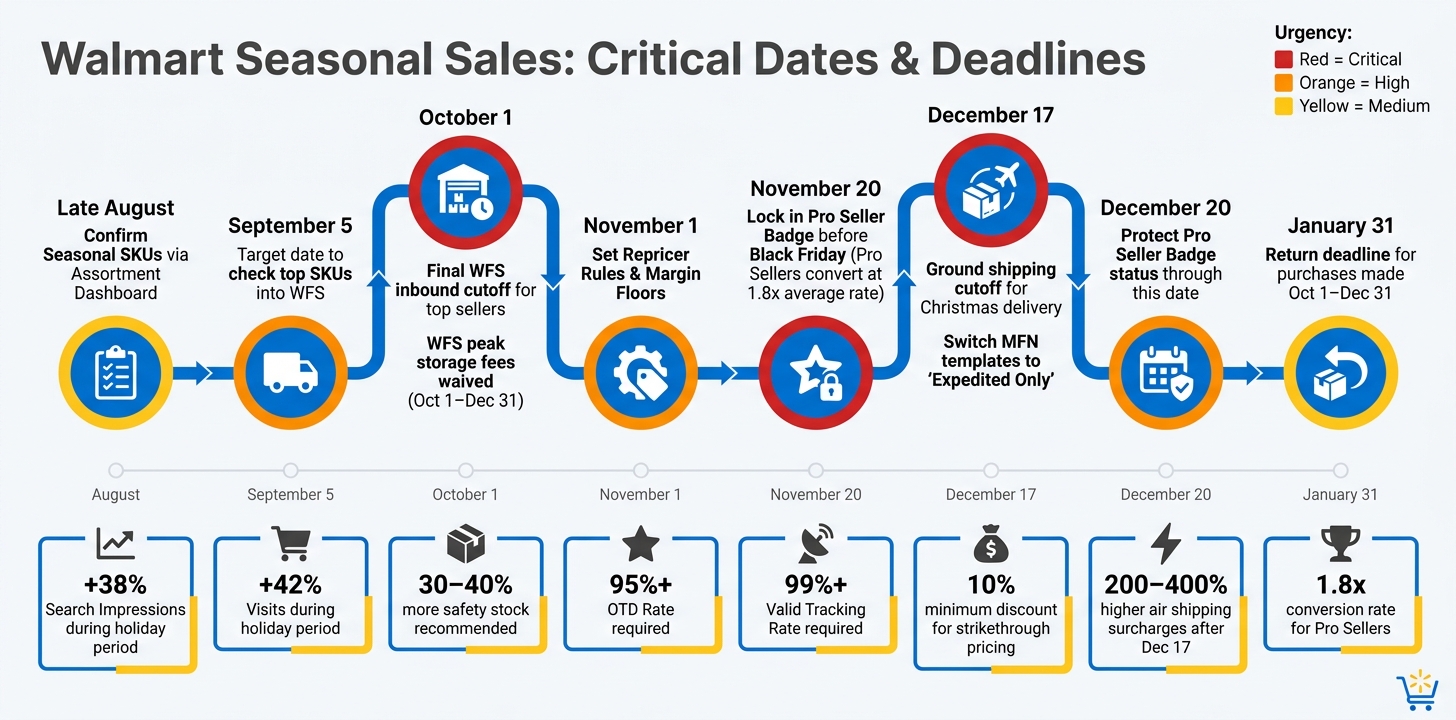
Walmart Seasonal Sales Checklist: Key Dates & Deadlines
How to Skyrocket Your Walmart Sales with Game-Changing Strategies
sbb-itb-e2944f4
Pre-Season Readiness Checklist
Start by locking in your assortment, inventory, fulfillment setup, and account health before peak season hits. The goal is simple: assign owners early, set deadlines, and avoid last-minute scrambling once inventory starts moving.
Confirm Seasonal SKUs, Forecast Demand, and Set Reorder Points
First, figure out which products matter most. Focus on your top-selling SKUs – the top 20% of items that drive the most sales volume. These products should get first priority for inbounding. Use Walmart’s Assortment Growth dashboard and Assortment Explorer to confirm your winners and spot rising demand.
Once your SKU list is set, forecast demand. Use last year’s sales, seasonality, and current demand signals to estimate how much inventory you’ll need. Walmart Fulfillment Services (WFS) waives peak-season storage fees from October 1 through December 31, which gives sellers room to hold 30%–40% more safety stock during that period. That extra buffer can help you avoid stockouts in December, when it’s often too late to recover lost sales.
For timing, check your top-selling SKUs into WFS by September 5. October 1 is the latest cutoff.
Next up: fulfillment capacity and shipping cutoffs.
Check Fulfillment Capacity, Shipping Cutoffs, and Account Health
Review fulfillment now, not later. If you use WFS, monitor inbound shipments every day and keep a self-fulfillment backup plan ready in case warehouse check-in delays show up. If you run MFN, confirm carrier transit times and delivery coverage in early Q4.
December 17 is the cutoff for standard ground shipping if you want to guarantee Christmas delivery. After that date, MFN sellers should change shipping templates to "Expedited Only" or extend handling times. That removes the "Arrives by Christmas" badge and helps you avoid air shipping surcharges that can be 200%–400% higher than standard rates.
Then check account health before holiday traffic puts pressure on your operation.
Keep your On-Time Delivery (OTD) rate above 95% and your Valid Tracking Rate (VTR) above 99%. During the holiday season, Walmart counts Saturdays, Sundays, and even Christmas Day as business days. That means customer messages need a response within 24 hours, including weekends and holidays. Set weekend coverage before traffic spikes.
Also keep an eye on the 5th and 20th Pro Seller Badge refresh dates. Hit the November 20 Black Friday window, then protect badge status through December 20. Pro Sellers convert at 1.8 times the rate of the average Marketplace seller.
Priority Table for Weekly Task Ownership
Use this table to assign clear ownership and deadlines before the season starts.
| Task | Owner | Due Date | Urgency |
|---|---|---|---|
| Confirm Seasonal SKUs via Assortment Dashboard | Merchandising | Late August | High |
| Finalize Demand Forecast & Safety Stock Levels | Operations | Early September | High |
| Inbound Top-Selling SKUs to WFS | Operations | October 1 | Critical |
| Audit Listing Quality & Mobile Optimization | Marketing | Mid-October | Medium |
| Set Repricer Rules & Margin Floors | Merchandising | November 1 | High |
| Lock in Pro Seller Badge Requirements | Operations | November 20 | Critical |
| Switch Shipping Templates to "Expedited Only" | Operations | December 17 | High |
Listing, Pricing, and Promotion Checklist
With inventory and fulfillment locked in, the next job is simple: make sure your product pages, prices, and promos are set up to turn traffic into sales.
Update Listing Content for Seasonal Search and Conversion
Seasonal search patterns change fast. In October, shoppers tend to browse with broad category terms like "family games." By November, they shift to more specific, high-intent keywords. In December, speed matters most, so phrases like "arrives by Christmas" and "last-minute" carry more weight. Your titles and bullet points should match that intent at each stage.
Start with the Listing Quality Dashboard in Seller Center. Use it to fix missing attributes, duplicate listings, image warnings, and suppressed listings. Sellers who use this dashboard see an average 60% increase in orders.
Use high-resolution, mobile-first images. Add one or two lifestyle photos that show the product in use and make the size easier to understand.
Double-check category placement and attributes so your items can appear in seasonal gift categories and filtered results. Put low-review listings at the top of the queue. 62% of surveyed Walmart customers say ratings and a high volume of reviews inspire them to buy.
Once the page is ready to convert, move to pricing and margin before any promo goes live.
Review Price Positioning, Margin Floors, and Markdown Timing
Use the Pricing Insights Dashboard to check competitive price and Buy Box Win Rate. Then set your minimum margin in the Walmart Repricer before turning on promotions.
If you want markdowns to appear as strikethrough pricing, the promo price must be at least 10% below the comparison price. For "dazzling deals", Walmart recommends at least 20% off or $50 off the comparison price.
Leave a 5%–10% margin cushion for the longer holiday return window. Purchases made between October 1 and December 31 can be returned through January 31. That extra cushion can save you from getting squeezed after the sale.
Turn on promotional pricing 24–48 hours before launch.
Confirm Promotion Setup and Date Windows
After pricing is set, check every promo window and discount rule before launch.
Make sure each promotion has a clear start and end date. Also confirm that the discount meets the 10% minimum threshold for strikethrough pricing. If you submitted items for Flash Deals or Seasonal Events through the Deals Dashboard, verify that they were approved and that the correct promo price is showing on the product page.
Inventory needs one more close check before launch. Promoted SKUs that go out of stock can hurt ranking over time, so your hero SKUs should be inbound and ready before the promo window opens.
Use this timing map to keep pricing and promo work on track:
| Timing | Action |
|---|---|
| 8 weeks out | Review inventory and set margin floors in Repricer |
| 4 weeks out | Submit Flash Deals/Rollbacks; review strikethrough eligibility |
| 1–2 weeks out | Activate promotional pricing; verify display on product pages |
| During event | Monitor Buy Box Win Rate; confirm inventory levels for promoted SKUs |
Advertising and In-Season Control Checklist
Once your listings and promos are live, the job changes. Now it’s about keeping campaigns profitable when traffic spikes and mistakes get expensive. That starts with a clean campaign setup before peak dates, then a tight daily routine once the rush begins.
Set Up and Segment Walmart Ad Campaigns Before Peak Dates
Keep evergreen and seasonal campaigns separate. Evergreen campaigns handle steady baseline traffic. Seasonal campaigns are where you push harder for holiday demand.
A simple month-by-month structure helps keep that split clear:
| Sales Phase | Primary Objective | Keyword Strategy | Bidding Strategy |
|---|---|---|---|
| October | Awareness/Seeding | Broad category & brand terms | Moderate; focus on impression share |
| November | Consideration | High-intent & competitor terms | Increased multipliers for premium spots |
| December | Conversion/Urgency | Proven top-converting terms | Aggressive; 150–200% multipliers |
Launch campaigns at least four weeks before peak dates. That gives Walmart’s system time to gather data and gives you time to spot what people are starting to search for.
Early on, use automatic targeting campaigns to find new seasonal search terms. Then move the best performers into manual campaigns, where you have tighter control. It’s a simple flow: let the platform surface ideas first, then put budget behind the terms that are already showing promise.
In December, update ad creative to lean into urgency. Messaging like "Last-Minute Gifts That Arrive on Time" works well, especially when you also call out fast shipping or gift cards. This is also the time to move more budget into December so campaigns don’t hit daily caps during busy hours.
Before paid media goes live, check the basics:
- Buy Box ownership
- Inventory levels
- Listing quality scores
That step matters more than it sounds. Sending ad traffic to a suppressed listing or an out-of-stock product is just burning money.
Daily Checks Across Sales, Stock, and Fulfillment
Once campaigns are live, manage them by the day, not the week. Peak weeks move too fast for a "we’ll check it Friday" approach.
| Metric Category | What to Check | Target/Threshold |
|---|---|---|
| Advertising | Budget pacing | Avoid budget caps during peak hours |
| Sales | Sales and ad revenue | Monitor for peak-day swings |
| Inventory | In-stock status | Stop campaigns immediately on any out-of-stock SKU |
| Buy Box | Buy Box Win Rate | Use the Repricer to "Match external seller price" and prevent listing suppression |
| Fulfillment | OTD | Maintain above 95% |
| Fulfillment | VTR | Maintain above 99% |
| Account Health | 24-hour customer response rate | Must respond within 24 hours, including weekends |
A few of these checks need fast action, not just observation. If a SKU goes out of stock, pause campaigns right away. If Buy Box ownership starts slipping, use the Repricer to "Match external seller price" to help prevent listing suppression.
Customer service is another area where sellers get caught off guard. Walmart counts weekends and holidays as operational days, so your team needs to monitor and respond on Saturdays, Sundays, and even Christmas Day. Automated responses do not count toward Walmart’s response rate metrics.
When to Bring in Extra Marketplace Support
If daily monitoring starts to slip, it’s better to hand off execution before results slide. When your team can’t keep up with daily PPC, listing checks, inventory review, and account monitoring, Emplicit can step in and handle those seasonal tasks.
Post-Season Review and Next-Step Summary
After peak traffic drops off, shift from daily monitoring to a 48-hour performance audit. The season may be over, but the work isn’t. This is the point where you sort out what sold, what sat there, and what needs to change before the next seasonal push.
Audit Results by SKU, Promotion, and Ad Spend
Start with inventory reconciliation. Run the Inventory Reconciliation Report within 48 hours of the season close. Then use the Inventory Health Report to check sell-through, aged units, and surplus stock.
Here’s the benchmark to watch:
- A sell-through rate of 1.5 or higher is considered Excellent
- A sell-through rate below 0.75 points to overstocking
Once inventory is squared away, move to search terms and ROAS. Review post-event search terms, NTB, and ROAS to spot the campaigns and keywords worth repeating.
Then look at promotions. Compare referral fees and WFS fees against the promotional price to see the margin impact. Check your Buy Box Win Rate to make sure you held ownership through the season. After that, review your Content Quality Score in the Listing Quality Dashboard. Scores below 60 often lead to search suppression, so weak content needs to be fixed before the next peak.
Key Actions to Repeat Next Season
Use what you find to update next season’s forecast, reorder points, promo windows, and content refresh dates. In plain terms, the audit should shape the next plan, not just sit in a spreadsheet. Put more budget behind the formats and keywords that drove the strongest ROAS and NTB results in the next campaign cycle.
Running this audit after each season helps keep inventory, listings, pricing, and ads lined up before the next peak window opens.
FAQs
How early should I start preparing for Walmart holiday sales?
Start getting ready for Walmart’s seasonal sales well ahead of time. Review seasonal data at least two months before big events so you’re not making last-minute calls.
By October, launch ad campaigns early to build visibility. Then update your listings, titles, keywords, and pricing at least one month before peak periods so your products have time to gain momentum.
What should I do if a promoted SKU goes out of stock?
Move fast to limit damage to your search rankings, because stockouts during peak seasons can hurt visibility.
Watch in-stock rates closely, check your Unpublished Items dashboard for deactivated listings, and keep healthy stock levels for your top-performing hero SKUs. Emplicit can help support inventory management and account health.
Which metrics matter most during peak season?
During peak season, keep a close eye on the metrics that can make or break sales.
That means watching inventory and in-stock rates, Buy Box performance, pricing against competitors, the impact of promos and deals, campaign results, and customer experience metrics like On-Time Delivery, Order Defect Rate, ratings, reviews, and service responsiveness.
Use Walmart’s inventory, pricing, campaign, and performance dashboards to track these numbers throughout the busiest shopping windows. If one metric starts to slip, you’ll want to catch it fast – not after sales have already taken a hit.