

If you sell on Amazon in 2026, long-tail keywords can bring higher intent traffic and lower PPC costs than broad terms. In this guide, I’d narrow the field like this: Helium 10 is the best all-around pick, Jungle Scout is strong for product research plus keywords, MerchantWords is best for raw keyword discovery, SellerApp fits sellers who tie research to PPC, DataHawk is best for tracking performance over time, and Keyword Tool for Amazon is the simplest pick for autocomplete ideas.
Here’s the short version:
- Use Helium 10 if you want keyword research, reverse-ASIN lookup, listing work, and ads in one place.
- Use Jungle Scout if you also care a lot about niche and product demand.
- Use MerchantWords if your main goal is finding more Amazon search terms.
- Use SellerApp if PPC management matters as much as keyword research.
- Use DataHawk if you want rank, ad, and competitor tracking after research is done.
- Use Keyword Tool for Amazon if you want a fast list of autocomplete phrases and nothing more.
Long-tail searches like “32 oz water bottle with time marker” or “BPA-free glass meal prep containers with lids” often convert 2x to 3x better than broad terms and can come with lower CPCs. So when I compare tools, I’d focus on four things:
- Autocomplete mining
- Reverse-ASIN research
- Listing support
- PPC planning
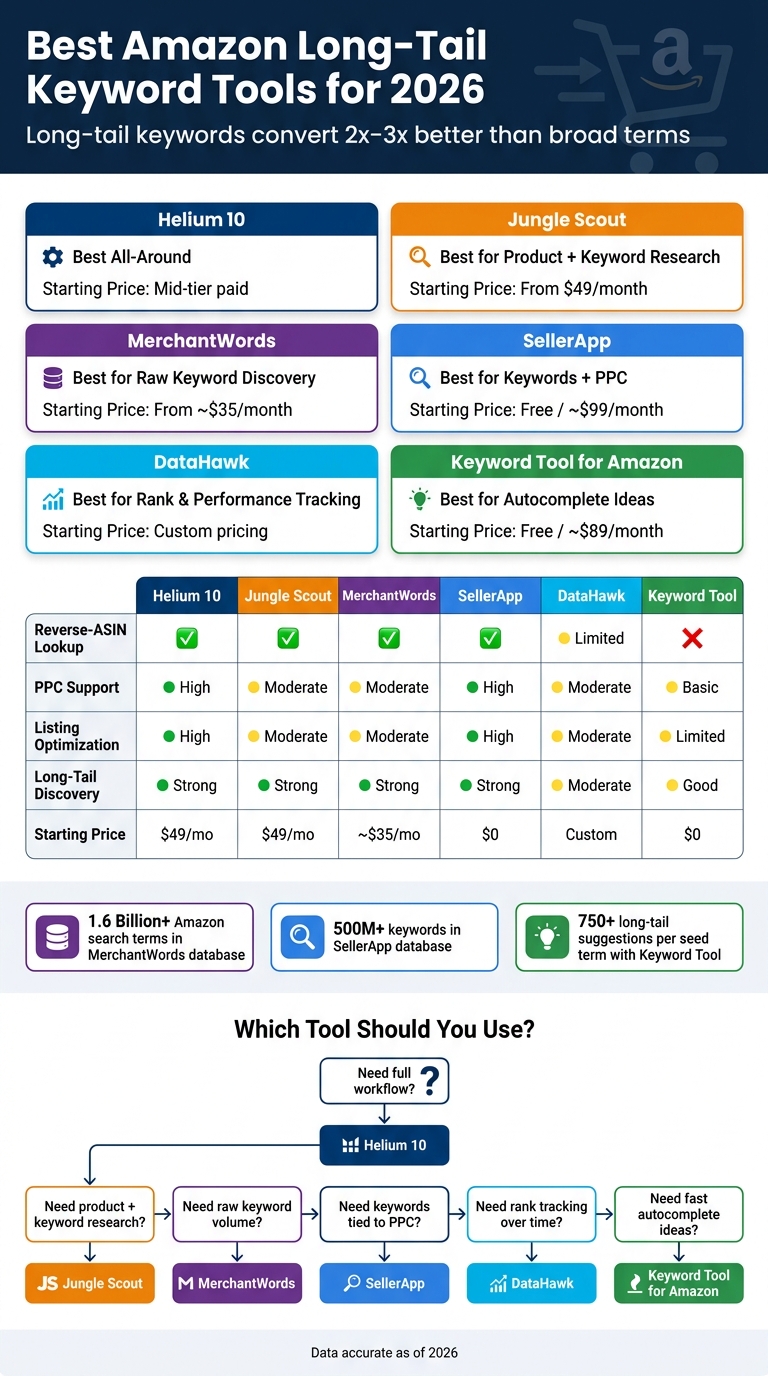
Best Amazon Long-Tail Keyword Tools 2026: Side-by-Side Comparison
How to Discover Long-Tail Keywords for Amazon Listings and PPC Campaigns?
sbb-itb-e2944f4
Quick Comparison
| Tool | Best For | Reverse-ASIN | PPC Help | Starting Price |
|---|---|---|---|---|
| Helium 10 | Full workflow | Yes | High | Mid-tier paid plans |
| Jungle Scout | Product + keyword research | Yes | Moderate | $49/month |
| MerchantWords | Amazon keyword ideas | Yes | Moderate | About $35/month |
| SellerApp | Keywords tied to ads | Yes | High | $0 / about $99/month |
| DataHawk | Rank and ad tracking | Limited | Moderate | Custom pricing |
| Keyword Tool for Amazon | Autocomplete mining | No | Basic | $0 / about $89/month |
If I were choosing fast, I’d match the tool to the job first, then check search caps, seat limits, and marketplace access before paying.
1. Helium 10
Helium 10 is a full Amazon seller suite built around Magnet for keyword expansion, Cerebro for reverse-ASIN research, and Frankenstein for cleaning up and organizing big keyword lists. Put those together, and you get coverage for keyword discovery, competitor research, and list cleanup. In practice, that means it can help across discovery, cleanup, listing placement, and PPC.
Data Sources and Signal Quality
Helium 10 pulls from Amazon search and product signals to surface keyword ideas tied to demand on the platform. That gives you a practical way to spot feature-, use-case-, and attribute-based queries.
Long-Tail Discovery and Competitor Mining
Cerebro is built for competitor mining. Drop in an ASIN, and you can see the keywords that listing ranks for, including lower-volume phrases that often show stronger buying intent than broad head terms.
Magnet works alongside it by expanding a seed term into related keyword groups. A simple way to narrow the list is to use Magnet’s Word Count filter for at least 4 words, then pair it with Phrases Containing so the results stay tied to the seed term. That trims a broad list down fast and makes the long-tail terms easier to act on. Once you’ve mapped the terms, you can move them into listings and ad groups.
Listing Optimization and PPC Support
After you build your keyword list, Helium 10’s listing tools help map terms into titles, bullets, descriptions, and backend fields. They also check whether your target terms are included and indexed. If you run out of room, place overflow long-tail terms in bullets or backend fields.
For PPC, Adtomic supports dayparting and hourly performance data. That’s useful when you want to focus spend on the time windows where long-tail targets convert best. The main drawback is the usage caps.
Plan Limits That Affect Day-to-Day Use
Usage caps are the main constraint. Platinum gives access to keyword search, reverse-ASIN, and listing tools, but those limits can slow down repeated long-tail research. Diamond increases limits and adds more tracked keywords and seats. Enterprise adds more seats, more accounts, and API/integration support.
2. Jungle Scout
Jungle Scout leans on Keyword Scout, Rank Tracker, and Opportunity Finder for long-tail research. Put those together, and you get keyword discovery, demand checks, and rank tracking in one place. That’s where Jungle Scout stands out: it gives you Amazon-native keyword data and rank tracking in the same workflow.
Data Sources and Signal Quality
Keyword Scout pulls search-volume data straight from Amazon, so the numbers reflect actual shopper searches. It also adds marketplace signals like estimated sales, competition level, and trend data. That gives you a clearer read on whether a long-tail phrase has steady demand or is gaining traction in the U.S. marketplace.
Long-Tail Discovery and Competitor Mining
Keyword Scout can take a seed term and expand it into exact and broad variations, along with search volume, PPC bid ranges, and competition data. Rank Tracker shows which long-tail keywords a competitor ranks for, then helps you work those terms into titles, bullets, and backend terms. Opportunity Finder adds a proprietary Niche Score from 1 to 100 to surface high-demand, low-competition niches. That can help you spot long-tail clusters before the space gets crowded.
Listing Optimization and PPC Support
You can export Keyword Scout terms, sort them by intent, and place the best-fit phrases in titles, bullets, and backend terms. On the PPC side, bid ranges help you pick long-tail terms with lower competition and clearer purchase intent. In plain English, those are often better targets for lower-CPC Sponsored Products campaigns.
Rank Tracker then lets you watch for organic lift while PPC runs are active. That makes it easier to decide when to keep, increase, or cut bids on certain targets.
Plan Limits That Affect Day-to-Day Use
Jungle Scout’s 2026 Catalyst plans come in three tiers, and those limits shape how much long-tail research you can do each month.
| Plan | Monthly Price | Annual Price | Keyword Scout Searches | Keyword History | Tracked Products |
|---|---|---|---|---|---|
| Starter | $49/month | ~$29/month | ~50/month | ~1 month | ~50 |
| Growth Accelerator | $79/month | ~$49/month | ~250/month | ~1 year | ~150 |
| Brand Owner + CI | $149/month | ~$129/month | ~5,000 rank-tracked keywords | ~2 years | ~2,000 |
The Starter plan gives you 50 Keyword Scout searches per month and one month of keyword history, which can feel tight if you’re testing several products at once. Growth Accelerator makes more sense for serious long-tail work, especially since a full year of keyword history helps with seasonal planning around U.S. demand cycles.
The Brand Owner + CI tier can include up to 10 users, about 2,000 tracked products, and 5,000 rank-tracked keywords. That setup fits established brands or agencies that manage larger catalogs.
Next, MerchantWords takes a more Amazon-search-focused approach to long-tail discovery.
3. MerchantWords
MerchantWords is built for Amazon keyword discovery. It doesn’t try to be an all-in-one seller platform, which is part of the appeal. If your main job is finding search terms first and handling the rest of the workflow in other tools, it fits that use case well.
Data Sources and Signal Quality
MerchantWords runs on Amazon search behavior, not a mix of retail and web data. It includes estimated monthly search volume, autocomplete suggestions, related searches, and trend data. The platform uses Amazon-only customer search data, with a database of about 1.6 billion Amazon search terms across 20+ marketplaces. Data is collected daily and fully refreshed every 3–4 weeks.
It also includes 12+ years of historical keyword volume data, which is useful when you’re looking at seasonality in the U.S. market. If you sell products that spike around holidays, back-to-school season, or summer shopping, that history gives you more than a snapshot. It shows the pattern.
Long-Tail Discovery and Competitor Mining
This is where MerchantWords tends to shine.
The Keyword Multiplier tool takes a seed keyword and spins it into hundreds of related terms. Enter something like keto snack, and you can pull up phrases such as keto snack bars and keto snack pack, along with more specific long-tail terms you can use in listings or ad groups.
ASIN Plus, its reverse-ASIN lookup tool, shows the keyword phrases where a competitor’s product ranks on page one of Amazon search results. That’s handy because it pulls out multi-word, buyer-intent terms you may not find through manual brainstorming alone.
MerchantWords also includes Emerging Trends, which surfaces fast-growing or brand-new search terms. That can help sellers spot demand early, before a niche gets too crowded.
Put simply: MerchantWords is strongest when you want search data and keyword ideas. It’s less built for hands-on workflow tasks tied to optimization.
Listing Optimization and PPC Support
A common way to use MerchantWords is pretty straightforward. Export the long-tail keyword list, group terms by intent, and place the strongest phrases in:
- Titles
- Bullets
- Backend search terms
You can also use those grouped terms to build exact-match and phrase-match PPC ad groups. MerchantWords gives you the keyword set, but the ad execution itself usually happens in another platform.
Plan Limits That Affect Day-to-Day Use
MerchantWords pricing mostly changes based on search limits, marketplace access, number of users, and export capacity.
| Plan | Monthly Price | Users | Marketplace Access | Notable Limits |
|---|---|---|---|---|
| Silver | About $35/month | 1 | Single marketplace (e.g., Amazon.com) | About 500 searches/month |
| Gold | About $79/month | 2 | Regional access (e.g., North America bundle) | About 1,000 searches/month |
| Platinum | About $149/month | 3–5 | Global marketplaces | Unlimited searches |
| Enterprise | About $749/month | Up to 20 | Global coverage | Unlimited searches |
CSV export limits also increase by plan tier. For teams handling multiple ASINs or selling outside the U.S., Platinum is usually the better fit because it includes unlimited searches, broader marketplace coverage, and ASIN Plus in the U.S.
That discovery-first setup works well with the next tool, which leans more heavily into PPC use.
4. SellerApp
SellerApp brings keyword research, reverse-ASIN lookup, and PPC automation into one flow. The big draw is simple: it helps sellers move from keyword ideas to PPC action faster than a tool built only for research.
Data Sources and Signal Quality
SellerApp pulls in signals from Amazon search, listings, BSR, categories, sales, and reviews. It then applies machine-learning models to score demand, competition, and profitability using rank, price, and inventory data.
That feeds a database of 500+ million keywords. Each keyword includes search volume, CPC estimates, competition scores, and conversion probability.
Long-Tail Discovery and Competitor Mining
SellerApp’s Keyword Research, Product Keyword, and Competitor Analysis tools let you start from seed terms, ASINs, or competitor listings. From there, you can build out long-tail phrases and review data like search volume, competitiveness, and relevance scores.
The Chrome extension helps speed this up by expanding seed terms with letter and number variations. That makes it easier to pull more Amazon autosuggest ideas than doing it by hand.
For competitor research, Reverse ASIN lookups and listing deconstruction show which keywords rival products rank for. That includes long-tail terms in backend fields, which can help you spot gaps in your own listing and PPC targeting.
Listing Optimization and PPC Support
SellerApp also ties research back to execution. Its Listing Quality Score checks your content for keyword coverage across the title, bullet points, and description. If high-value long-tail terms are missing, the tool flags them.
Once you find those gaps, SellerApp can push that work into bid and search-term management. The platform also includes:
- Bid management
- Budget pacing
- Keyword Miner for pulling converting search terms from ad reports
This is where SellerApp starts to feel more like a workflow tool than a pure keyword database.
Plan Limits That Affect Day-to-Day Use
| Plan | Monthly Price | Key Limits |
|---|---|---|
| Freemium | $0 | Restricted tracking, limited searches and product data |
| Pro / Professional | Around $99/month | Mid-tier feature access; caps on ASINs and keywords tracked |
| Smart with Automation | Around $149/month intro, then about $250/month | Full PPC automation, broader tracking, longer data history |
| Enterprise / Agency | Custom pricing | Higher-volume research, multi-account support |
Free works well for testing. Pro makes sense for smaller catalogs. Smart is the step up if you want full PPC automation, while Enterprise is geared toward larger teams.
DataHawk is the reporting-first option for teams that want deeper keyword tracking and performance visibility.
5. DataHawk
DataHawk is a reporting-first platform for tracking Amazon SEO, ads, and market signals in one place. If you already have keyword ideas, it works best as a way to watch how those terms perform over time.
Data Sources and Signal Quality
DataHawk combines public Amazon storefront data, including pricing, Best Seller Rank, and organic and sponsored visibility, with private account data from connected seller or vendor accounts through the Amazon Selling Partner API and Amazon Advertising API.
For long-tail research, one big plus is cleaner volume data. DataHawk uses Amazon Search Terms Performance data for tracked keywords instead of scraped estimates. That helps you sort low-volume phrases with more confidence and avoid chasing shaky numbers.
Long-Tail Discovery and Competitor Mining
DataHawk includes three tools for long-tail keyword research: Keyword Suggestions, Keyword Lookup, and Keyword-Seeded Suggestions. Keyword Lookup shows the keywords your products ranked for organically in the last 7 days. Keyword-Seeded Suggestions takes a seed term and expands it into related phrases, which helps when you’re building out a long-tail keyword map before choosing which ASINs to track.
After you set your target terms, DataHawk can show where competitors are beating you. Market Intelligence scans the first five pages of Amazon search results each day and tracks organic rank, sponsored placements, and editorial recommendations for tracked keywords. That makes niche gaps easier to spot.
Listing Optimization and PPC Support
DataHawk tracks both organic and sponsored ranks for target keywords, so you can see how listing updates affect visibility over time. On the ads side, Amazon Ads API data pulls campaign, keyword, and product-level metrics, like impressions, clicks, spend, and sales, into the same view. In plain English: you can check whether a long-tail term is bringing traffic, sales, or neither.
A common workflow looks like this:
- Find long-tail candidates with Keyword Suggestions
- Add the best terms to listing copy and backend fields
- Launch Sponsored Products campaigns around those keywords
- Watch rank changes and ad results inside DataHawk
That makes DataHawk useful for going from keyword picking to rank and ad review without bouncing between tools.
Plan Limits That Affect Day-to-Day Use
DataHawk’s current pricing is custom annual pricing based on volume, with plans shaped around a brand’s sales volume and data-tracking needs. Each tracked ASIN or keyword uses 1 credit, while each category uses 50 credits.
| Tracking Unit | Credit Cost | Practical Impact |
|---|---|---|
| 1 ASIN | 1 credit | Scales directly with catalog size |
| 1 keyword | 1 credit | Pushes teams to focus on the long-tail terms that matter most |
| 1 category | 50 credits | Best saved for core market segments |
| Advertising data history | Last 60 days | Limits longer-range PPC trend review |
| Market Intelligence history | Up to 2 years | Good for category trend research |
For smaller sellers, the takeaway is pretty simple: track the long-tail clusters that matter most and skip the rest.
6. Keyword Tool for Amazon
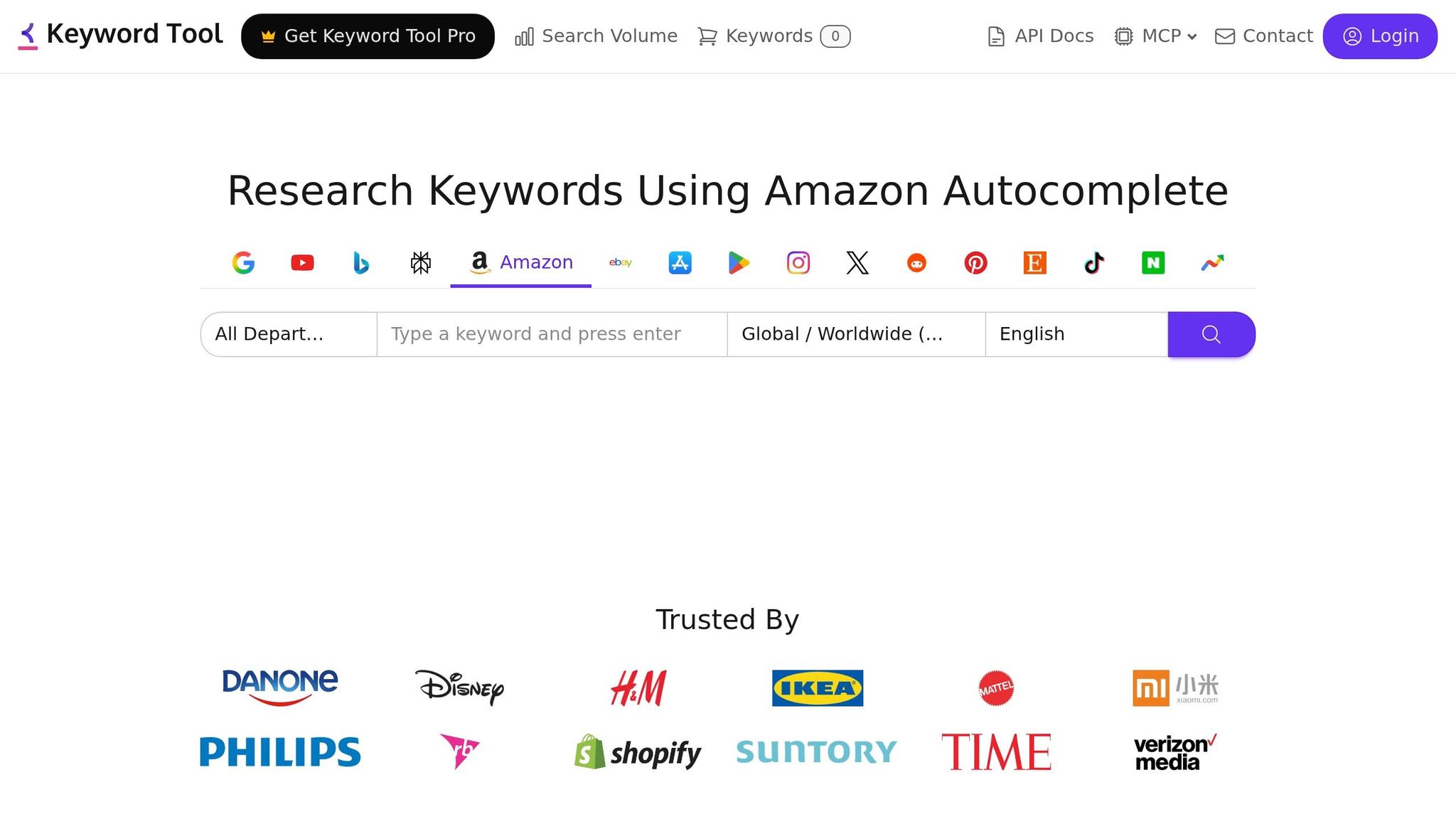
After a reporting-heavy tool like DataHawk, this is the fast lane for pure autocomplete discovery. Keyword Tool for Amazon is KeywordTool.io’s Amazon mode built for quick suggestion mining. It pulls ideas from Amazon’s autocomplete and related search suggestions, so you see the phrases shoppers type into the search bar, including misspellings, plural forms, and very specific product descriptions.
Data Sources and Signal Quality
The tool works by taking a seed term and running it through Amazon’s suggestion engine with different prefixes, suffixes, and letter combinations. That process can return 750+ long-tail suggestions in seconds. On paid Pro plans, those suggestions also include Google Ads data like search volume, CPC, and competition scores, added on top of the Amazon autocomplete results.
That extra data is useful, but there’s a catch. Search volume and CPC are third-party estimates, not Amazon-native numbers, so it’s smarter to use them as directional signals instead of hard truth.
Long-Tail Discovery and Competitor Mining
There is no native reverse-ASIN lookup here. That’s the main tradeoff. Keyword Tool is strong at suggestion mining, but weak when it comes to competitor mining. If you want to see which keywords a competitor ranks for, you’ll need another tool or some manual research to fill the gap.
Where it shines is speed and output. Drop in a seed like cast iron skillet and you can pull up phrases such as cast iron skillet pre-seasoned, 12 inch cast iron pan made in USA, and oven safe cast iron skillet for gas stove. Those are the kinds of specific, high-intent searches that broad head terms often miss.
Listing Optimization and PPC Support
Once you export the keyword list, you can map the strongest buyer-intent phrases to your title and bullet points. Then place plural forms, common misspellings, and synonyms in backend search terms. You can also filter by Amazon category, such as Sports & Outdoors or Home & Kitchen, which helps keep the list tied to the right department.
For PPC, the CPC estimates help with two practical jobs:
- Spot lower-cost long-tail terms that may be worth bidding on
- Flag expensive, low-volume phrases that may be better used as negatives
Plan Limits That Affect Day-to-Day Use
| Plan | Monthly Price | Annual-billed price | Daily Suggestion Cap | User Seats |
|---|---|---|---|---|
| Free | $0 | $0 | Limited results | Not specified |
| Pro Basic | About $89/month | About $69/month | About 750 suggestions/day | 1 |
| Pro Plus | About $99/month | About $79/month | About 1,500 suggestions/day | Up to 5 |
| Pro Business | About $199/month | About $159/month | About 5,000 suggestions/day | Up to 10 |
For solo sellers handling occasional product launches, Pro Basic will cover most use cases. Agencies or brands with large catalogs, especially during busy U.S. periods like back-to-school and the holiday season, will probably need Pro Plus or Pro Business so they don’t hit daily caps halfway through research.
A common complaint from reviewers is the price. Several note that it can feel expensive for a tool focused mostly on autocomplete aggregation, especially since it doesn’t include native rank tracking, listing audits, or sales estimates.
Next, compare all six tools side by side on data quality, discovery depth, listing support, PPC use, and limits.
Side-by-Side Tool Comparison
No single tool wins in every area. The right pick depends on what you need most: finding keywords, building listings, or running ads. This comparison strips things down to the tradeoffs that matter most for long-tail targeting.
Use the table below to compare discovery depth, competitor mining, and workflow support at a glance.
| Tool | Primary Data Source | Long-Tail Discovery | Reverse-ASIN | Listing Support | PPC Usefulness | Key Plan Restriction |
|---|---|---|---|---|---|---|
| Helium 10 | Modeled Amazon keyword index + rank tracking | Strong (Magnet + Cerebro) | Yes – organic and sponsored keywords | High – grouping, indexing checks, copy support | High – competitor term extraction | About 100 searches/month on lower paid tiers |
| Jungle Scout | Seed keywords + reverse-ASIN database | Strong – up to 10 ASINs at once | Yes – multi-ASIN comparison | Moderate – keyword grouping and export | Moderate – search term harvesting | 50 searches/month on Starter; 250 on Growth |
| MerchantWords | Amazon autocomplete database (1.6 billion+ keywords across 20+ marketplaces) | Strong – broad long-tail coverage | Yes – ASIN Plus | Moderate – keyword grouping and export | Moderate – search volume and trend signals | 500 searches/month on Silver; unlimited on Platinum |
| SellerApp | Amazon search, listings, BSR, reviews, and PPC data | Strong – seed terms, ASINs, and competitor listings | Yes – Reverse ASIN lookup | High – Listing Quality Score with keyword gap flagging | High – bid management and keyword mining from ad reports | Free tier heavily restricted; full PPC automation on Smart plan |
| DataHawk | Amazon storefront data plus Search Terms Performance and Ads API data | Moderate – Keyword Suggestions and Keyword-Seeded Suggestions | Limited – competitor rank tracking via Market Intelligence | Moderate – rank tracking tied to listing updates | Moderate – campaign, keyword, and product-level ad metrics | Credit-based tracking; 60-day advertising data history |
| Keyword Tool | Amazon autocomplete + Google Ads CPC and competition scores on paid plans | Good for broad idea generation | No native reverse-ASIN | Limited | Directional CPC data | Suggestion limits vary by plan |
Data Sources and Signal Quality
The data source matters more than the feature list might suggest. Two tools can both say they do keyword research, but the signals underneath can be very different.
Helium 10 blends search term performance, ranking data, and historical trends instead of leaning only on raw autocomplete scraping. Jungle Scout layers in marketplace signals like estimated sales, competition level, and trend data on top of its keyword database.
MerchantWords pulls from a 1.6 billion-keyword database built from Amazon autocomplete across 20+ marketplaces, which makes it strong for picking up the language shoppers actually type. SellerApp uses machine-learning models to score demand, competition, and profitability across a database of 500+ million keywords.
DataHawk takes a different route. It uses Amazon Search Terms Performance data for tracked keywords instead of scraped estimates, which can lead to cleaner volume numbers for low-traffic long-tail terms. Keyword Tool relies on autocomplete plus Google Ads CPC and competition scores on paid plans, so those numbers are best used as directional signals, not hard truth.
Long-Tail Discovery and Competitor Mining
If your main goal is autocomplete expansion, MerchantWords and Keyword Tool stand out. They’re good at turning one seed phrase into a long list of related search terms.
Jungle Scout is better when you want to compare several competing listings at once. Its multi-ASIN comparison is one of its main strengths. Helium 10 goes deeper on competitor mining with Cerebro, which pulls organic and sponsored competitor keywords along with estimated search volumes and ranking positions.
Keyword Tool is the outlier here. It does not offer native reverse-ASIN lookup, so it’s less useful when your workflow starts with competitor products instead of seed keywords.
Listing Optimization and PPC Use
Helium 10 is strongest when research needs to turn into listing work. It supports keyword grouping, indexing checks, and placement choices across titles, bullets, and backend search terms. That makes it more than a discovery tool. It helps you act on what you find.
Jungle Scout and MerchantWords lean more toward research and keyword organization. They help you gather and sort terms, but they offer less direct help with long-tail placement inside the listing itself.
SellerApp pushes further into execution. Its Listing Quality Score flags missing long-tail terms and ties into PPC bid management, which is handy if you want listing work and ad work connected in one place. Keyword Tool, by contrast, is more of a signal source than a hands-on workflow tool. It points you in a direction, but it does not do much of the heavy lifting after that.
Plan Limits That Affect Day-to-Day Use
For many sellers, the biggest headache is not features. It’s usage caps.
Helium 10 limits keyword research to about 100 searches per month on lower paid tiers. Jungle Scout’s Starter plan allows 50 Keyword Scout searches per month, while Growth allows 250. Those limits can get tight fast if you’re researching multiple products, testing angles, or checking competitors often.
MerchantWords gives more room for heavier research. Silver includes 500 searches, and Platinum includes unlimited searches at $149/month. Silver is single-country, Gold is regional, and Platinum is global.
DataHawk uses a credit-based model, where each tracked ASIN or keyword costs one credit, and ad data history only goes back 60 days. For U.S. sellers managing many SKUs – or agencies doing research across several accounts – lower tiers on most tools can start to feel cramped pretty fast.
Pros and Cons by Tool
Use this summary to pick the tool that lines up with how you work: discovery, optimization, or tracking. The table below shows each tool’s biggest strength, main drawback, and where it fits best.
| Tool | Strongest Long-Tail Advantage | Biggest Limitation | Best-Fit Use Case |
|---|---|---|---|
| Helium 10 | End-to-end keyword research and listing execution | Breadth adds complexity for sellers who only need basic research | Established sellers or teams that want research and execution connected |
| Jungle Scout | Keyword discovery tied to product demand and competition signals | Better as a broader product research suite than a deep keyword-mining tool | Product research with keyword support |
| MerchantWords | Large Amazon autocomplete database; slower refresh cadence | Weaker on PPC and listing execution | Keyword ideation and long-tail expansion |
| SellerApp | Stronger for blended research and PPC than for keyword-only research | Less focused on pure keyword research depth | Best for keyword research tied to ad decisions |
| DataHawk | Keyword rank tracking, competitor monitoring, and optimization visibility | Credit-based pricing and a steeper learning curve | Best for ongoing rank and performance tracking |
| Keyword Tool | Quick seed-term expansion into long lists of search phrases | No reverse-ASIN lookup, limited Amazon-native metrics on free tier | Early-stage brainstorming when speed matters more than depth |
The tradeoffs are pretty straightforward.
If you want one system that connects research to listing work, Helium 10 makes the most sense. If your main job is finding product ideas first and keywords second, Jungle Scout is a better match. MerchantWords works well when you need lots of long-tail ideas, but it’s not as strong once you move into PPC or listing changes.
For sellers who make ad decisions at the same time they do keyword research, SellerApp fits that workflow better. DataHawk is more about visibility over time – rank movement, competitor watch, and performance tracking. And if you just need to turn a seed term into a long list fast, Keyword Tool is the simplest place to start.
The next move is matching the stack to your catalog, team size, and how deep you need to go each week.
Conclusion
Once you stack up data sources, discovery depth, listing support, PPC use, and plan limits, the choice is less about finding one “best” tool and more about finding the right fit for how you work.
There’s no single platform that works for every Amazon seller. The better move is to choose based on your main workflow:
- Reverse-ASIN research and competitive mining: Helium 10 Cerebro and Jungle Scout Keyword Scout
- Autocomplete mining: Helium 10 Magnet and MerchantWords
- PPC planning: Helium 10, Jungle Scout, and SellerApp, which show CPC and conversion signals that help you go from a keyword list to a campaign build
The next thing to check is plan limits. Search caps and marketplace coverage shape how often you can run long-tail research, so it helps to estimate your monthly research volume before you pay for a plan. If you manage a larger catalog, an all-in-one suite can save time by bundling keyword research, rank tracking, and listing tools in one place.
If you need help turning keyword data into listings and PPC, Emplicit can support that workflow.
Choose the tool that fits your workflow, make sure your plan won’t slow down research, and put those insights to work before seasonal spikes hit.
FAQs
How do I choose the right tool for my workflow?
Pick the tool that fits your stage, budget, and goals.
If you’re just getting started, SellerApp and AMZScout usually cover the basics without pushing costs too high. If you need deeper data, Helium 10 and Jungle Scout are a better fit, especially for stronger analytics, reverse ASIN lookups, and SEO insights.
The key is to look at what each tool does best. Some are better for market research. Others shine in trend tracking or competitor analysis. The right choice depends on how you work today, and what gaps you need the tool to fill.
As your business gets more complex, a managed service like Emplicit can help with strategy and optimization.
Are long-tail keywords better for Amazon PPC?
Yes, long-tail keywords are often a better fit for Amazon PPC.
They usually get less search volume. But they make up for that with clearer shopper intent. When someone searches with a more specific phrase, they often know what they want. That can lead to better ad performance, higher conversion rates, and stronger profit margins.
Long-tail keywords also tend to have less competition. That can help you run campaigns more efficiently and bring in more targeted traffic that’s more likely to convert.
Which plan limits matter most before I subscribe?
Check whether the plan matches your business size, especially the number of ASINs you manage. If you run a larger catalog, you may need a higher-tier plan.
You’ll also want to confirm that the plan includes the features you need, such as competitor intelligence, international data, automated review tools, support for your sales volume, and whether billing is monthly or tied to an annual commitment.